Microsoft Teams Phone Review: Recent Releases and What's Coming in 2025

Microsoft Teams Phone has evolved from a simple communication tool into a powerful enterprise-grade voice solution. With continuous updates, it now offers advanced features that enhance call management, user experience, and administrative control, meeting the demands of modern business communication.
- Call Management: Advanced call queues, auto attendants, and shared line appearance help streamline how organizations handle incoming and outgoing calls.
- User Experience: Features like call park, live transcription, and seamless device switching reduce friction across remote, hybrid, and on-site teams.
- Admin Control: Centralized provisioning, custom policies, and deep Microsoft 365 integration ease the burden on stretched IT teams.
ZIRO simplifies centralized provisioning, custom policies, and deep Microsoft 365 integration, reducing the IT burden while enhancing visibility and control over Teams Phone deployments.
Recent Releases in Microsoft Teams Phone
1. Queues App for Teams Phones
The Queues app brings call queue functionality directly into Microsoft Teams Phone, allowing agents and supervisors to manage customer interactions from Teams-certified devices.
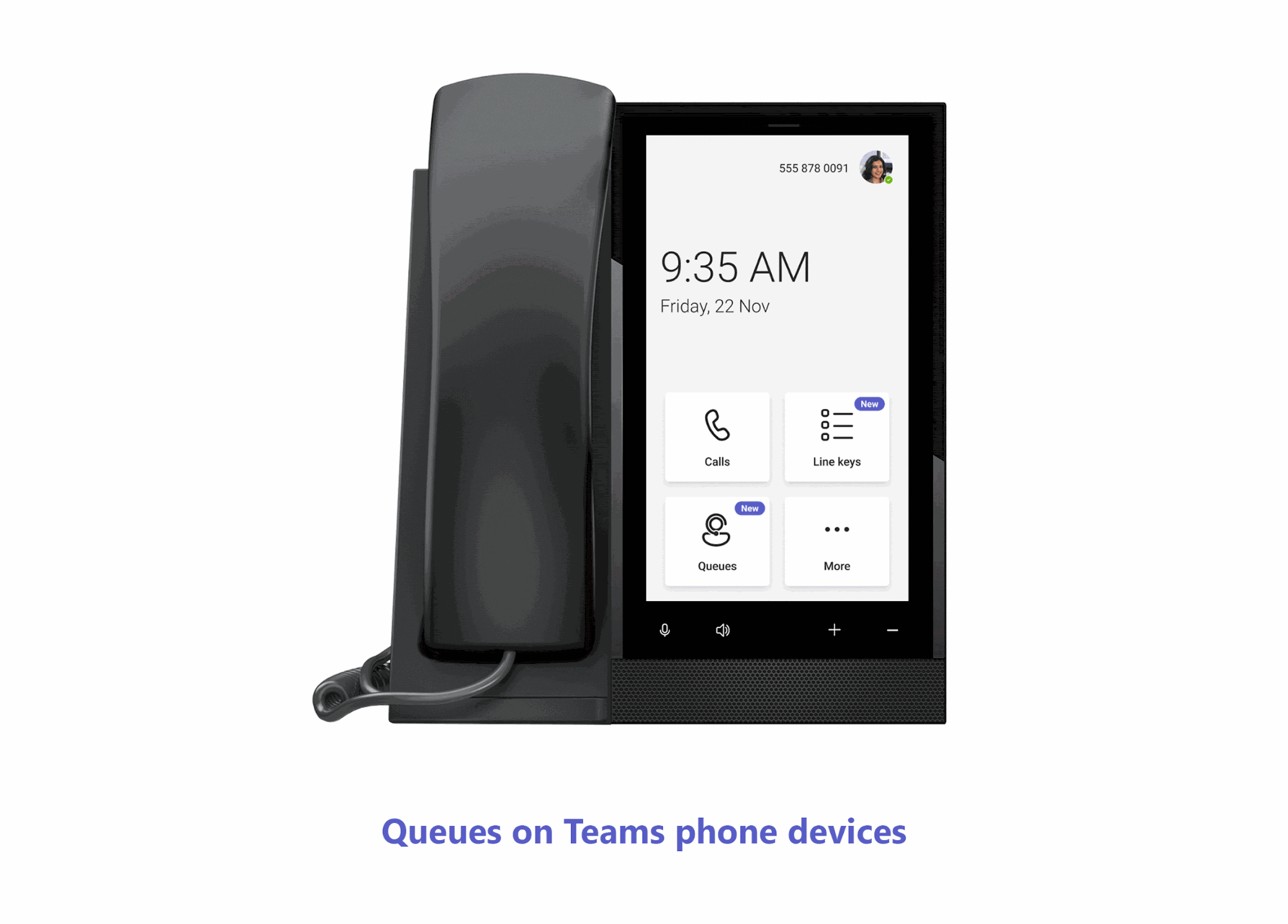
Key Features: Self-service participation (agents join or leave queues without admin involvement); live queue metrics (call wait times and queue length); full call control (hold, transfer, and make calls on behalf of queues); call history access; and built-in collaboration through chat and call. Integrated into the Teams interface, the Queues app gives users access to calls routed through auto attendants or call queues, while supervisors monitor queue activity in real time and manage memberships.
2. People App on Teams Phone Devices
The People app is now available on Teams Phone devices, giving users an easy way to manage contacts, view presence, and streamline communication, all from their desk phone.
Key Features: Contact management (browse, search, and favorite contacts); presence visibility (see real-time availability before calling); one-tap calling; a fully synced experience across desktop and mobile; and a productivity boost from fewer missed connections. The app lives directly on Teams-certified desk phones and syncs with your Microsoft 365 directory, letting users search for coworkers, check availability, and place calls with a few taps.
3. Multi-Banner Updates for Notifications
Microsoft has enhanced how notifications appear on Teams Phone devices, allowing multiple banners to display at once so users never miss important updates.
Key Features: Stacked notifications for calls, messages, and meetings; faster response; a cleaner UI; improved workflow for frontline workers and receptionists; and device optimization across certified hardware. Previously, Teams Phones showed only one notification at a time; now multiple notifications can be displayed simultaneously in a stack, so users can view and manage everything in real time.
4. Speed Dial on Line Keys (Touch Phones)
Teams Phone users on touchscreen devices can now assign speed dial contacts to line keys, enabling one-tap access to frequently dialed numbers.
Key Features: Instant calling; customizable layout; easy configuration with no IT support required; time savings for high-volume callers; and a consistent experience across supported touchscreen Teams Phones. On compatible devices, users map specific contacts to virtual line keys by long-pressing a key and selecting a contact. Note: This feature began rolling out in mid-March 2025 and was expected to be fully available for Worldwide and GCC users by late March 2025.
5. Direct Routing Phone Number Management
Managing phone numbers tied to Direct Routing is now easier with built-in tools in the Teams admin center. IT admins can assign, track, and update numbers without jumping between portals.
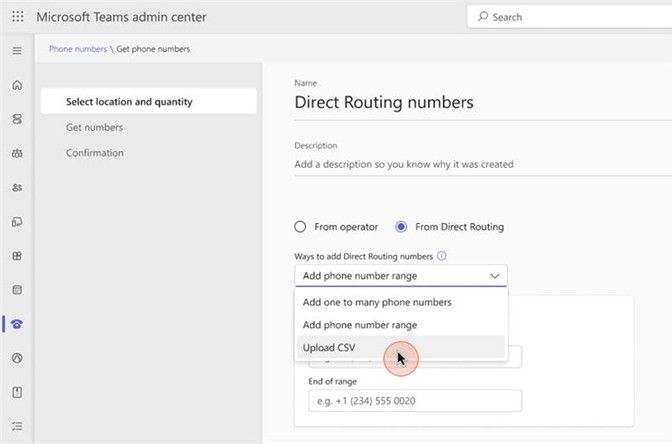
Key Features: Centralized management within the Teams admin center; improved visibility into number status and assignment history; fewer tools required (less reliance on PowerShell); faster provisioning; and error reduction. Admins can manage Direct Routing numbers directly in Teams, including assigning numbers to users, resource accounts, or auto attendants. While Microsoft has improved this, ZIRO takes it further with automated bulk provisioning, seamless carrier management, and error-free number assignments.
6. Extensibility for PSTN Calls
Microsoft Teams now lets third-party apps become part of the PSTN calling experience, so developers can bring useful data and actions from business tools right into Teams calls.
Key Features: Stay in the call and see relevant customer or business data; smarter conversations with insights, notes, or call history; streamlined workflows (update a CRM record without leaving the call); custom experiences tailored by role; and better outcomes for customer-facing roles. Behind the scenes, developers use Microsoft's tools—like Azure Communication Services and Teams SDKs—to build these experiences.
What's Coming to Teams Phone in 2025
1. Copilot-Generated Summaries for Call Transfers
Microsoft plans to introduce Copilot-generated call summaries during transfers, helping recipients quickly understand the context before answering.
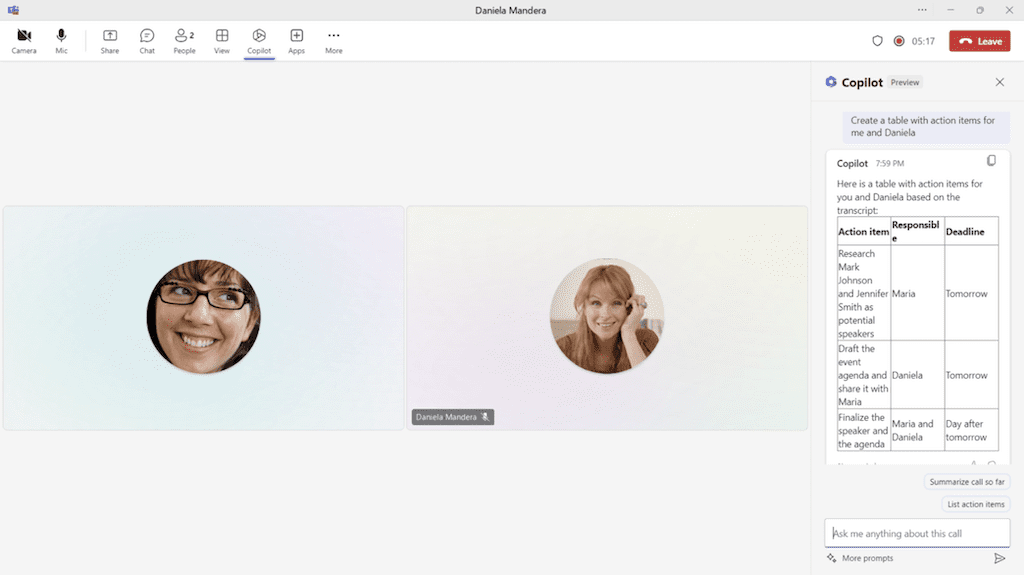
Key Features: Smarter call handoffs (recipients get context without asking the caller to repeat details); time savings; AI-powered context generated in real time; ideal for support teams; and consistency in what's shared during transfers. The receiving party will see this summary before accepting the call. This feature was expected to enter public preview in April 2025.
2. AI-Powered Interpreter Feature
Microsoft is working on a real-time interpretation feature in Teams Phone, designed to break down language barriers during live calls using AI.
Key Features: Real-time interpretation; support for global teams; an accessible UI; reduced miscommunication; and AI-driven translation using Microsoft's language models. Once released, this will provide live interpretation during PSTN and VoIP calls, detecting the languages spoken and delivering translated audio or on-screen text in real time. Microsoft announced a preview would be available in early 2025, supporting up to nine languages with simulated personal voice translation.
3. Teams Phone Extensibility for Dynamics 365 Contact Center
Microsoft is bridging Teams Phone with Dynamics 365 Contact Center to create a connected, voice-enabled customer engagement experience.
Key Features: A unified experience with voice and customer data side-by-side; contextual calling; simplified workflows with no app switching; enterprise-ready design for regulated environments; and built-in analytics. Agents can handle inbound and outbound calls directly from the CRM interface, with call controls and customer data in one place. As businesses integrate Teams Phone into their customer service workflows, ZIRO ensures a smooth transition with expert migration support, ongoing UC management, and helpdesk enablement. Release timeline: Public preview scheduled for April 2025; general availability planned for Summer 2025.
Maximize the Value of Microsoft Teams Phone with ZIRO
Microsoft Teams Phone is evolving into a powerful enterprise-grade solution, offering smarter call management, an improved user experience, and greater IT control. With each update, it becomes a stronger replacement for legacy phone systems without the complexity. But technology alone isn't enough. At ZIRO, we help organizations unlock the full potential of Teams Phone by simplifying migration, provisioning, and ongoing management. Whether you're integrating with a SIP trunk, a UCaaS provider, or starting fresh, ZIRO connects Teams Phone in a way that enhances and supports your existing environment. Ready to make the switch without the hassle? Let's talk.

Make your oldest system your smartest.
The fastest way to turn complex technical information into clear, actionable intelligence.