Here's Our Ultimate Microsoft Teams Phone Migration Checklist

Moving to Microsoft Teams Phone can transform your organization's communication. It consolidates voice, video, and collaboration into a single platform, boosting efficiency, cutting costs, and improving team connectivity. However, a successful migration requires careful planning and execution. This ZIRO article provides a comprehensive Microsoft Teams Phone Migration Checklist. Follow these essential steps to ensure a seamless transition.
What Is Microsoft Teams Phone Migration?
Microsoft Teams Phone migration is the process of transitioning an organization's existing telephony system to Microsoft Teams Phone. This involves moving from traditional landlines, PBX, or VoIP systems to the MS Teams unified communications platform. Teams Phone consolidates communication tools within the Microsoft 365 ecosystem, letting your employees make and receive calls (both internal and external) on the same platform they already use for messaging, collaboration, and file sharing.
Why Is Having a Migration Checklist Important?
Migrating to Microsoft Teams Phone can be complex, with many moving parts. A well-structured checklist prevents you from overlooking critical steps and helps you:
- Stay Organized: Track tasks from infrastructure assessments to user training.
- Avoid Common Pitfalls: Proactively address bandwidth limitations, device compatibility, and regulatory compliance.
- Minimize Downtime: Plan for minimal business disruptions.
- Ensure User Adoption: Include user communication and training.
- Facilitate Testing and Troubleshooting: Conduct pre-rollout testing to catch issues early.
Our Effective Microsoft Teams Phone Migration Checklist
1. Pre-Migration Planning
Assess Your Existing Telephony System: Evaluate your current setup, including legacy systems (PBX, VoIP) and call flows; create an inventory of phone numbers, extensions, and specific user needs (e.g., call forwarding, voicemail); and compile CSRs (Customer Service Records) from your carriers if porting.
Licensing Requirements: Determine the appropriate Microsoft Teams Phone licenses. Microsoft offers various options, such as Microsoft 365 Business Voice and Microsoft 365 E5, which include Teams Phone capabilities.
Bandwidth and Network Readiness: Conduct a network assessment to check bandwidth capacity for Teams voice and video traffic, and configure Quality of Service (QoS) settings to prioritize voice traffic and minimize latency.
Regulatory Compliance: Ensure your migration plan complies with relevant regulatory requirements, including local laws regarding data privacy, call recording, and emergency services (E911).
2. Choose Your External Connectivity Option
Microsoft Teams Phone replaces your entire telephony structure, so you need to pick the right connectivity option. You have four options:
- Direct Routing: Connects Teams with your existing PSTN provider through a Session Border Controller (SBC). Ideal for businesses with complex telephony needs. ZIRO offers a comprehensive Direct Routing as a Service (DRaaS) solution.
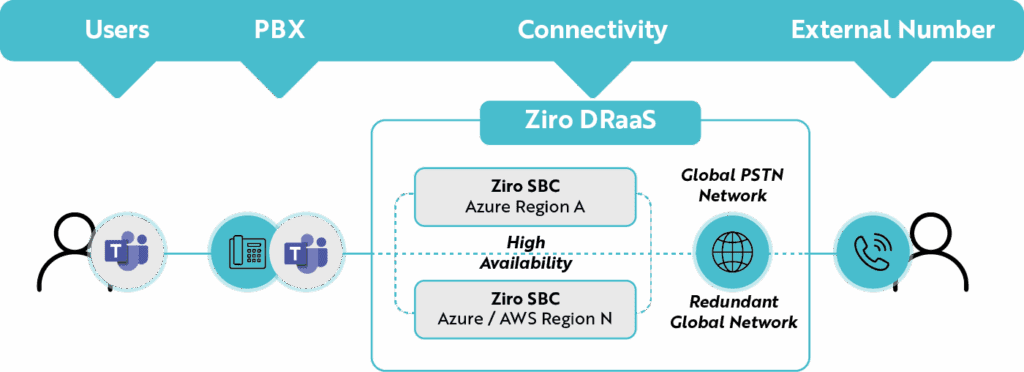
- Microsoft Calling Plans: A straightforward, out-of-the-box solution managed by Microsoft, including phone numbers and call minutes. Best for organizations seeking simplicity.
- Operator Connect: Connects Microsoft Teams to your telecom operator's network directly through the Teams Admin Center, with enhanced support from your operator.
- Teams Phone Mobile: Integrates mobile network services with Teams, letting users use their mobile numbers within the platform. Beneficial for a mobile workforce.
3. Prepare the End Users
Understand User Profiles and Use Cases: Identify different user groups (desk workers, remote employees, customer service teams, executives), define how each will use Teams Phone, and map each profile to the appropriate features. Device Requirements: Ensure all necessary hardware—headsets, desk phones, mobile devices—is compatible with Microsoft Teams Phone. User Communication and Training: Develop a comprehensive communication and training plan, with role-based training sessions.
4. Testing and Piloting
Test Call Functionality: Make test calls to verify basic functionality, check call quality across different network conditions, and verify all features (call forwarding, voicemail) work as expected. Run a Pilot Migration: Select a small group of users, migrate them, gather feedback, and resolve issues before full deployment.
5. Full Deployment
After successful testing and piloting, deploy Microsoft Teams Phone across your organization: port phone numbers from your old system, assign appropriate licenses, confirm proper setup for all user profiles, and implement necessary integrations. Large organizations may consider phased migration to manage the process more effectively.
6. Post-Migration Monitoring and Support
Monitor the system closely after deployment: use the Microsoft Teams Admin Center and Call Quality Dashboard to monitor call performance; provide ongoing training and documentation; and regularly check for security and compliance issues.
Get Help With Your Microsoft Teams Phone Migration
Microsoft Teams Phone migration isn't a walk in the park. Without expert guidance, you risk disrupting business operations and frustrating employees. That's where ZIRO comes in. We offer a proven and guaranteed blueprint for a successful migration—from planning to execution and support—handling all the complexities, including Direct Routing, SIP trunks, and Microsoft Calling Plans. For example, we helped a major Canadian law firm migrate from its legacy phone system to Microsoft Teams Phone, ensuring 600 workers across different locations can now communicate more efficiently.
Conclusion
Migrating to Microsoft Teams Phone can be overwhelming, with potential pitfalls like downtime, poor call quality, or failed configuration. Organizations can avoid these pitfalls with a well-structured approach, which is what a checklist provides. ZIRO takes the stress and worry away by offering a migration strategy tailored to your specific needs. Ready to make your migration a success? Contact us today to book a discovery call.

Make your oldest system your smartest.
The fastest way to turn complex technical information into clear, actionable intelligence.